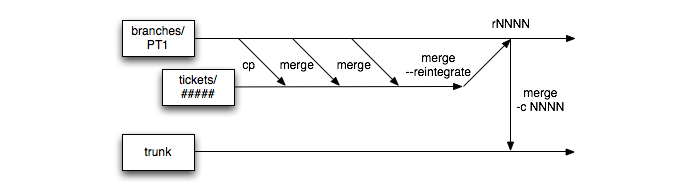
We have just migrated the version control system of our web application from SVN to GIT. While there are a lot of sources available online to perform this, not all of them consider the special case when one need to migrate branches that might not have been re-integrated to the trunk yet.
I have mixed a few different sources in order to get this right for us. I will not re-write what has been written so many times by others (often in a better and clearer way that what I could do) but will simply list the steps that I followed and links to the different sources.
Read more...
When gathering contact lists, it is quite common to end up with quite a few duplicate email addresses. In order to do some cleanup in those lists, I have created a simple ruby script that accepts a CSV file as input and analyzes the list to extract only unique entries.
The reason to create the script in the first place was that some entries were containing multiple email addresses for the same contact. When comparing lists it was therefore not easy to see if the email address was present in one list and not in the other. The first step was therefore to create one line per email address which then allowed for an easier cleanup of duplicate entries.
Since some of the email addresses in my list were quite old, I have added a simple verification on whether the domain of each address contains some valid MX server.
More detailed information is available on the project page.
Read more...
Everybody is aware of how important it is to perform backup. This is especially true when you do not own the architecture on which your files are hosted.
Many of you probably remember the outage that GMail faced a bit more than a year ago when accounts have been accidentally deleted. Most of them (all?) have eventually been restored but this incident was probably a wake-up call for many. Once again, unless you have a local backup of your data, you are actually not owning anything when working with cloud services.
Quite a few websites have been spreading the word about GMVault lately. This is a great initiative that allows to easily backup data from your GMail account and easily restore them in case you need to. In order to automate the process, and ensure that backups are taken on a regular basis, I have configured a NAS (Synology DS111) to perform this operation.
Read more...
Since the background of this website was a bit simplistic (not to say particularly dull), I have been looking for something to replace it. And well, if you are reading this from the website itself and not the RSS feed, you migh have notice the new pattern in the background.
I ended up using some pattern from the Subtle Patterns website and while I am not a designer, I think it looks much better now.
There are quite a few SVN commands that I do not use so often but that I need every once in a while. One of them is related to reintegrating a branch into the trunk.
Assuming that one is working with the trunk as a working copy and want to reintegrate the branch called feature, the reintegrate command is simply:
Read more...
There are quite a few SVN commands that I do not use so often but that I need every once in a while. One of them is related to getting log information from previous commits.
While it might be trivial to get those data from a SVN GUI client, getting the list of commited files and comments from previous version from the command line can be tricky.
Read more...
There are quite a few SVN commands that I do not use so often but that I need every once in a while. One of them is related to reverting a single commit.
If some code has been committed to the repository but you then realize later that those changes should not have been commited for some reason (code breaks some functionalities, tests not running, …), it is possible to execute a reverse merge.
Read more...
At D-Sight, we use Zoho CRM to follow-up on our leads (people who try out D-Sight or D-Sight Web). Being able to integrate Zoho solutions with our products makes it easier for us to focus on important activities, rather than spending time importing contacts manually from our applications.
The problem is that Zoho documentation is rather sparse on technical details about Ruby integration. Quite a lot of things are available for PHP and Java users but for the moment it seems that Ruby is not a top priority. However, Zoho offers a great API and therefore integration with Ruby is not that complicated.
We have therefore created a script that reads in a MySQL database, extracts the latest entries and sends them to Zoho. In case any error occur while sending the data to Zoho, an email containing the entries that could not be added is sent out to the administrator.
Read more...
Before making a new bulk import in PHPList it is important to ensure that the imported users will not override the “unconfirmed” status of existing users. Since PHPList does not offer options to blacklist existing unconfirmed users we will proceed in two steps:
- Export unconfirmed users
- Blaklist unconfirmed users
Read more...
If you have ever been working on code to realize that you cannot commit the changes that you have made to the original branch you were working in, it might get a bit annoying. Fortunaltely, there is an easy way to commit your code in a new branch (without you losing any data).
In order to do that, you only need to follow three steps:
- Create a new branch in which you will commit your changes
- Switch your current working copy to this new branch
- Commit your changes to the new branch
Read more...
When using javascript in Rails in order to fill in forms and remain on the same page, it is nice if after submitting and resetting the form, the focus is set back on the first element of the form. In order to do this, you can simply use the following piece of JS in your file.js.erb:
Read more...
Ubercart comes with a catalog that allows to display the different products in categories. This is a pretty nice and convenient way to browse through the different product families but for the product browsing itself, a list is much more easy to go through. The problem with the catalog list / table default display, is that it doesn’t use Views but rather a default call to the ubercart table display.
Fortunately, Ubercart makes it easy to override this default call. For this, one just needs to define a themable function (theme_uc_catalog_products($products)) in template.php in order to make a call to a predefined view with the function views_embed_view.
Read more...
While working on the online store of D-Sight, it was necessary to include a link back to the cart when a user is on the checkout page. It is possible to click on the Cancel button but this is a bit counter-intuitive and one might not know whether the cart will remain or whether it will be emptied. Therefore, two options have been considered:
- Change the Cancel button label to rename it “Back to cart” for instance
- Modify the cart pane in the checkout view to include additional information (such as a “Back to cart” link)
Read more...
When I wrote the article about drupal and metadata, I needed to include some code snippets in order to illustrate what needed to be done. At the time, only nanoc, haml and sass were installed in my environment to generate this website. While I thought that it would be trivial to display code between pre tags, it turned out that I coudn’t get haml to display anything properly - even though I tried pretty much every combination (:preserve, whitespace preservation ~, …) in the haml-lang website.
Read more...
While trying to ensure that a website created in Drupal was correctly verified with Google webmasters tools, I needed to add some metadata to the homepage of the website. Since this was a one shot only operation, it was not necessary to modify the full website template. Instead, in such cases, it can be done quite easily by adding the following bit of PHP code to the body of the home page and to ensure that the input format is set to PHP code.
Read more...
An easy way to limit (or fully avoid) spamming is to encrypt the email addresses that appear on your website. In order to do that, services exist and help you convert your email address (or even the complete mailto: link) into hexadecimal entities.
The following two services can be used for such a purpose:
A lot of others services are obviously available and a simple search on Google for “encrypt email” will provide you a lot of results but I have been very happy with those two so far and they have been used with success on D-Sight website as well as on this website.
It seems that I am spending some time learning Drupal so the content of
this post may defer from the editorial line a bit but as usual, I hope
it may help someone.
The current drupal installation I am working with has
CCK and
Popups: Add and Reference
(let’s call it PAR for future (shorter) references) modules. Unfortunately, by default
the links added by PAR are in a new div tag below the input fields which
increase the length of the form quite a bit as you can see below.
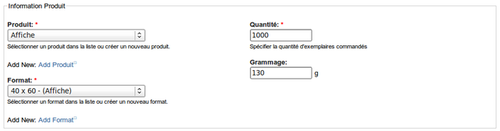
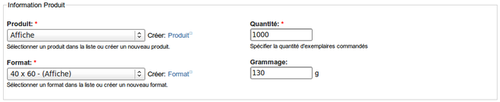
What I am proposing here is a way to put the PAR links inline with the
input field. I am quite a beginner with Drupal so the method may not be
really clean or fail proof and your comments about any easier way of
doing it are welcomed. The result looks like the screenshot below.
Read more...
Still working with Drupal and still learning a lot… The challenge I was
facing was to let users upload files to a specific folder but to
restrict access to that file so that it cannot be downloaded by anybody
simply by giving the file path (private download). Therefore, users are
allowed to post content but not access it (otherwise nothing prevent
them to access files from other users in the folders).
Fortunately - as often with Drupal - there are already solutions on the
web:
- Mixing private and public downloads in Drupal 6
- Restrict specific folders from public download (via .htaccess)
Read more...
It is no secret, it is easy to share a firefox profile. I am running a
dual boot Linux / Windows
and was therefore interested to share my Firefox profile between the
two. But in the process, I actually became interested to be able to
access that profile from my work computer. After all, there are already
extensions to store bookmarks remotely so why not do the same with the
complete profile.
This is the reason why I decided to create a new profile on my
Dropbox. That way, the profile is stored
remotely and synchronized in real-time between my work computer and my
personal computer (both Linux and Windows).
Creating a new profile can be done in two ways. The first is by using
the graphical interface and the second is by modifying the profiles.ini
file directly. I will present both.
Read more...
I wanted to install Linux on my computer (Lenovo X200) but I was a bit
afraid to mess with the partition table due to the fact that there is a
hidden Restore & Recovery partition available at boot up when one press
on the ThinkVantage button.
I did want to keep Windows available as there are a few programs that
can come handy and I didn’t want to mess with the default behavior of
the computer (understand that the ThinkVantage button should still work,
that windows should still be accessible and that I can basically still
use the laptop the way I used to do :-)).
I will explain in the following paragraphs how to reformat the drive
using open source tools and how I created the new partitions for the
X200.
Read more...
In my previous post, I detailed how I
partitioned
the drive of the X200 in order to install Linux. I will now give a few
words about the installation process of Linux Mint 7. The focus of this
post is set on how to keep your boot loader as it is and allow a dual
boot Windows/Linux from the Windows boot loader.
There are only a few things that I changed from the default
installation. The first one concerns the partitioning. Since the drive
is already partitioned, it is necessary to tell the installer which
partitions to use for what. From the picture below, you can easily see
which partitions are used and where they are mounted.
Read more...